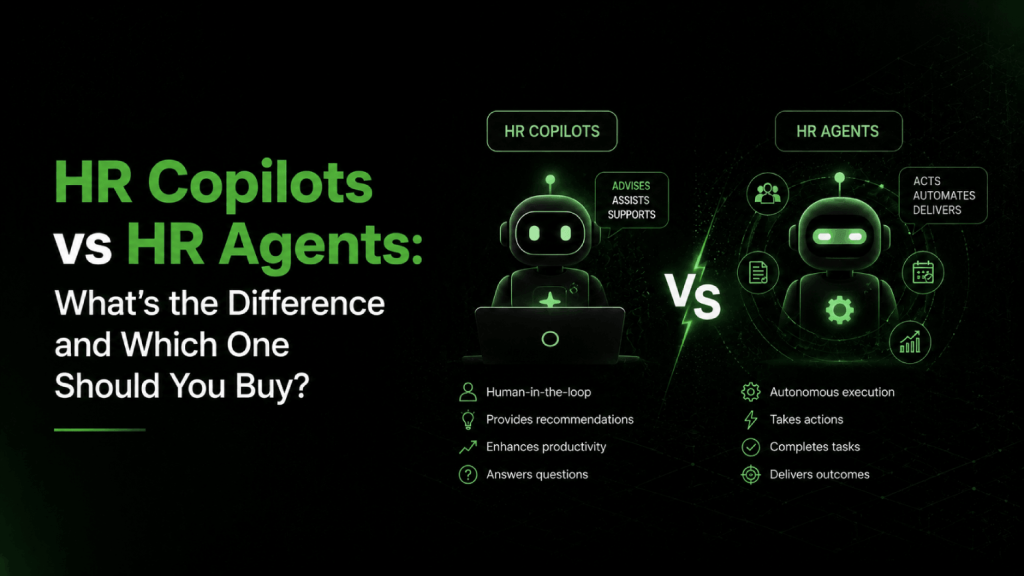

- An HR copilot assists a human , it answers questions, drafts content, and surfaces information inside tools you already use, but a person always decides what happens next.
- An HR agent acts autonomously , it receives a goal, executes multi-step tasks across systems, and reports back when done, with no human required at each step.
- Most HR teams need a copilot first. Agents require mature integrations, clean data, and governance frameworks that most organizations have not built yet.
- The buying decision hinges on four variables: how much autonomy you are willing to grant, what your integration infrastructure looks like, your risk tolerance for errors, and who owns accountability when the AI gets it wrong.
- Vendors blur these categories deliberately. “AI agent” is now a marketing term, and plenty of tools calling themselves agents are glorified chatbots with better UX.
The distinction between HR copilots vs HR agents is the most practically important concept for any HR leader evaluating AI tools right now. An HR copilot is an assistive AI that helps HR professionals and employees complete tasks faster inside existing tools, always with a human making final decisions. An HR agent is an autonomous AI that executes multi-step workflows across systems on its own, like scheduling interviews, routing tickets, or updating records, without waiting for human approval at each step. Copilots suit organizations that want AI assistance with low autonomy risk. Agents suit organizations with mature data infrastructure and a clear governance model for AI-driven actions.
Why Most Buyers Treat Copilots and Agents as Synonyms
The confusion is reasonable. Vendors market both as “AI assistants,” both live inside familiar interfaces, and both can answer a question or draft a document on demand. From a demo, they look nearly identical. The difference shows up at the boundary between suggestion and action.
A copilot surfaces a recommended response to an employee question about PTO policy. A human clicks send. An agent reads the question, checks the policy in your HRIS, calculates the employee’s balance, updates the leave request system, and sends the employee a confirmation automatically. Same starting point, completely different execution model.
The marketing muddies this further. Microsoft Copilot is primarily assistive, yet Microsoft now sells what it calls “agents” built on top of Copilot Studio that can take actions in connected systems. Workday uses the word “agent” for what are effectively guided workflow automations. The vocabulary has outpaced the actual capability.
What Does an HR Copilot Actually Do?
A copilot is an AI layer that sits on top of your existing tools and responds to natural language prompts. It reads context from your environment and produces outputs for a human to review and act on. Think of it as a very capable draft machine and information retriever.
Common Copilot Capabilities in HR
- Drafting job descriptions, offer letters, performance review templates, and HR policies
- Answering employee questions about benefits, policies, and procedures by reading your knowledge base
- Summarizing meeting transcripts, performance data, and candidate feedback
- Generating first-draft interview questions aligned to a job profile
- Searching across HRIS records, documents, and email to surface relevant information
The defining characteristic: every output is a suggestion. The human owns every action that follows. This keeps the risk profile low and the governance model simple, which is exactly why copilots are the right entry point for most HR organizations.
Microsoft Copilot for Microsoft 365, for example, works inside Teams, Outlook, Word, and SharePoint. HR teams use it to summarize long email threads, draft policy documents, and pull answers from HR knowledge bases stored in SharePoint. Microsoft’s HR adoption guidance describes an employee self-service agent capability designed to reduce costs by making benefits information easier for employees to access, while the HR professional continues to manage the underlying policy and systems.
Products like SAP Joule, Oracle AI for HR, and embedded AI in platforms like HiBob and BambooHR are also largely copilot-style in their current implementations. They assist. They do not act. See our comparison of Workday AI, SAP Joule, and Oracle AI for HR for a deeper look at how enterprise HCM vendors have built these capabilities into their stacks.
What Does an HR Agent Actually Do?
An HR agent receives a goal and figures out the steps to complete it autonomously. It can call APIs, read and write to connected systems, make conditional decisions, and hand off tasks to other agents or humans only when it hits a boundary it cannot cross alone.
What makes something genuinely agentic
- Multi-step reasoning: The agent breaks a goal into subtasks and executes them in sequence or in parallel.
- Tool use: It can call external systems, including your ATS, HRIS, calendar, payroll platform, and ticketing system, via APIs.
- Memory and state: It tracks context across a session or across time, so it knows what it has done and what is still pending.
- Conditional logic: It can branch based on what it finds, escalating to a human if the answer is ambiguous, or proceeding if not.
- Autonomous completion: It delivers a finished outcome, not a suggestion.
A real-world HR agent example: an employee submits a parental leave request. The agent reads the request, checks the employee’s tenure and eligibility in the HRIS, cross-references the company policy document, calculates the leave duration and pay impact, updates the leave management system, notifies the manager via Slack, triggers the payroll adjustment in the payroll platform, and sends the employee a confirmation with a calendar block. No HR ticket required. No human touched it after the employee submitted the form.
Oracle’s AI agents for HR page documents multiple HR use cases for agentic AI, ranging from candidate screening and onboarding task orchestration to compliance monitoring and workforce planning. IBM’s analysis of AI agents in HR frames them as systems that can perceive, reason, and act across HR workflows, explicitly distinguishing them from earlier chatbot and RPA automation.
For a full treatment of what agentic AI can and cannot handle in HR service delivery, the guide to AI agents for HR service delivery covers the boundaries in detail.
Copilot vs Agent: A Direct Feature Comparison
| Dimension | HR Copilot | HR Agent |
|---|---|---|
| Core model | Assistive AI; human acts on outputs | Autonomous AI; executes actions itself |
| Decision ownership | Human | AI, within defined guardrails |
| Task complexity | Single-step generation or retrieval | Multi-step orchestration across systems |
| System access | Read-focused (surfaces information) | Read and write (updates records, triggers workflows) |
| Integration requirements | Low to moderate | High (API access to all touched systems) |
| Error consequence | Low (human reviews before acting) | High (agent may have already taken action) |
| Governance complexity | Low | High (audit trails, rollback, permission scoping) |
| Time to value | Days to weeks | Months (requires integration and testing) |
| Best for | Drafting, answering, summarizing, searching | Processing, routing, updating, orchestrating |
| Current market maturity | Mature, widely available | Emerging, production-ready in narrow use cases |
Where Does Workflow Automation Fit Into This Picture?
There is a third category that buyers often conflate with both copilots and agents: workflow automation tools. Products like Zapier, Make, or the built-in automation rules in platforms like Greenhouse and Ashby can execute multi-step processes across systems without human intervention. That sounds like an agent.
The critical difference is intelligence. Traditional workflow automation follows deterministic rules you write explicitly: “if field X equals Y, then trigger action Z.” An agent uses a language model to reason about a goal, generate its own plan, and adapt when conditions change. Workflow automation breaks when reality does not match the rules. An agent can handle ambiguity, ask clarifying questions, and adjust its approach mid-task.
In practice, the line is blurring. Most HR agents today combine LLM-based reasoning with traditional workflow automation under the hood. Products like Rippling and Deel have automation engines that are closer to sophisticated rule-based orchestration than to true agentic AI, even when they use “agent” language in their marketing. Buyers should ask vendors directly: does your system use an LLM to plan and execute tasks, or does it follow rules a human configured?
What Is Embedded AI, and How Does It Differ from Both?
Embedded AI is a fourth category worth naming separately. It refers to AI capabilities built directly into existing HR software features, as opposed to a standalone copilot or agent layer added on top.
Workday’s AI-powered attrition risk scoring is embedded AI. Eightfold’s candidate matching is embedded AI. The sentiment analysis baked into Culture Amp engagement surveys is embedded AI. You do not interact with it conversationally. It runs in the background and surfaces outputs inside the normal product interface.
Embedded AI is often the most immediately useful form of AI in HR because it requires no integration work, no prompting skill, and no change management. It is already part of a workflow your team already uses. The trade-off is that it is vendor-controlled, non-configurable, and opaque. You cannot ask it to do something different.
For teams evaluating AI people analytics platforms, the most practically useful AI is often embedded rather than conversational. The copilot and agent categories are relevant for cross-platform tasks; embedded AI wins for depth within a single tool.
Which One Should You Actually Buy?
Buy a copilot if your team spends significant time on information retrieval, drafting, or answering repetitive employee questions. The productivity gains are real, the implementation is fast, and the governance overhead is manageable. If your HR team of five is handling benefits questions, policy lookups, and onboarding documentation manually, a copilot pays for itself quickly.
Buy an agent if you have a high-volume, well-defined HR process that requires actions across multiple systems, and you have the integration infrastructure to support it. Leave management, onboarding task orchestration, and tier-one helpdesk resolution are the most production-ready agentic use cases today. See the complete guide to AI HR agents for a structured breakdown of where autonomous execution is genuinely ready versus where vendors are overselling it.
Do not buy an agent because the demo looks impressive. Agents fail loudly in production when the underlying data is messy, integrations are unreliable, or the governance model is incomplete. An agent that updates payroll records incorrectly without a human checkpoint is worse than no automation at all.
Decision framework by company profile
| Company Profile | Recommended Starting Point | Why |
|---|---|---|
| Startup, under 100 employees | Copilot embedded in existing tools | Low HR headcount; drafting and policy retrieval are the bottleneck, not process volume |
| Mid-market, 200 to 1,000 employees | Copilot now; evaluate agents for one high-volume process | Enough ticket volume to justify an agent in onboarding or leave; but integration work is real |
| Enterprise, 1,000+ employees | Both, in parallel, with separate governance tracks | Volume justifies agent investment; copilot serves HRBP and generalist teams |
| Distributed global workforce | Copilot for policy localization; agent for compliance routing | Country-specific policy variation is where copilots shine; routing to local experts is a good early agent use case |
| HR team without dedicated IT support | Copilot only | Agent implementations require API configuration and ongoing maintenance that HR cannot own alone |
What Governance Questions Must You Answer Before Buying an Agent?
Copilots have a forgiving governance model because humans review outputs before anything happens. Agents do not. Before you deploy an agent in HR, you need answers to at least these questions.
Accountability and audit
When an agent makes an error, who is accountable? The vendor, the HR team that configured it, or the manager who approved the deployment? Most contracts put liability on the buyer. You need a complete audit log of every action the agent took, every system it wrote to, and every decision it made along the way. If the vendor cannot show you that log in the demo, that is a disqualifying gap.
Permission scoping
An agent should have the minimum permissions required to complete its task, nothing more. An agent handling leave requests does not need write access to payroll records. Define the scope before deployment and test it. Agents that operate with over-permissioned access create both security and compliance exposure.
Escalation design
Every agent needs a defined set of conditions under which it stops and hands control to a human. These are not nice-to-haves. They are the primary risk control mechanism. Map these before you configure the agent, not after a production incident. The AI HR vendor evaluation checklist includes governance-specific questions worth running through any agentic vendor.
Regulatory compliance
In the EU, the EU AI Act places HR hiring and management AI tools in the high-risk category, which requires transparency, human oversight, and documentation. In the US, EEOC guidance on AI in employment decisions applies to agents that screen, score, or make decisions about candidates and employees. Agents that touch compensation, promotion, or termination carry the highest regulatory risk. This is not a reason to avoid agents, but it is a reason to know exactly what decisions your agent is making versus routing to a human.
For teams already working through bias and compliance questions in AI hiring tools, the guide to AI HR compliance and bias audit tools covers the vendors and frameworks that apply to agentic HR systems.
How to Evaluate Vendor Claims About AI in HR
Vendors will describe their product as a copilot, an agent, an assistant, or an “intelligent automation platform” depending on which label is getting more traction this quarter. Use this test instead of their vocabulary.
Ask: “Walk me through what happens when an employee submits a request. At each step, what does the AI do, and what does a human do?” If the answer shows a human reviewing and approving at every meaningful step, you have a copilot. If the answer shows the system completing the process and notifying the human only at the end, you have an agent. If the vendor cannot answer the question cleanly, you have a product that is still being built.
The second question: “What happens when the AI gets it wrong?” If the vendor describes a rollback mechanism, an audit log, and a defined escalation path, they have thought about this. If they say their AI is very accurate, that is not an answer. No system has zero errors, and error recovery design is how you distinguish mature products from demos.
For teams sourcing AI recruiting tools specifically, the category of AI sourcing tools includes both copilot-style products that assist recruiters and agent-style products that execute outreach sequences autonomously. The governance considerations are identical.
Frequently Asked Questions
What is the difference between an HR copilot and an HR agent?
An HR copilot assists a human by generating drafts, answering questions, or surfacing information, but a human takes every action. An HR agent acts autonomously, completing multi-step tasks across connected systems without human approval at each step. Copilots are assistive; agents are autonomous. The practical difference is who takes the action: a copilot gives you the draft, an agent sends it.
What can a copilot do for HR?
A copilot can draft job descriptions, offer letters, and HR policies. It can answer employee questions about benefits and PTO by reading your knowledge base. It summarizes meeting notes, performance reviews, and candidate feedback. It generates interview questions from job profiles. All of these are outputs for a human to review. The copilot does not update records, trigger payroll changes, or send official communications without human sign-off.
What are AI agents in HR?
AI agents in HR are autonomous systems that receive a goal and execute the steps to complete it across multiple tools and systems. A leave-management agent, for example, receives a request, checks eligibility in the HRIS, updates the leave system, notifies the manager, and adjusts payroll, all without a human touching each step. Oracle’s publicly documented AI agent use cases for HR include candidate screening, onboarding orchestration, compliance monitoring, and workforce planning.
Should a small HR team buy a copilot or an agent?
A copilot. Small HR teams rarely have the integration infrastructure, IT support, or process volume that justifies the implementation complexity of an agent. A copilot embedded in Microsoft 365, your HRIS, or your ATS will save significant time on drafting and policy retrieval within days of setup. Agents require API integrations, governance frameworks, and ongoing maintenance that typically need dedicated technical resources to sustain.
Are AI HR agents production-ready today?
In narrow, well-defined use cases, yes. Leave management, onboarding task routing, and tier-one helpdesk ticket resolution are the most mature agentic applications in HR at the time of writing. The market has been moving fast since 2023, and production deployments exist, but they remain concentrated in those bounded use cases. Agents handling compensation decisions, terminations, or complex policy exceptions are not production-ready for most organizations. The technology can technically execute these tasks, but the governance frameworks, regulatory requirements, and error-consequence severity make autonomous execution too risky without significant safeguards.
How do I know if a vendor’s “AI agent” is actually agentic?
Ask the vendor to walk you through a complete workflow from employee input to final outcome and identify every step where a human is required. If a human approves at each step, the product is a copilot with automation features, not an agent. A genuine agent completes the workflow and only involves a human when an escalation condition is triggered. Also ask what the audit log looks like and how the system recovers from an error. Vague answers to those questions signal an immature product.
What HR tasks should never be fully autonomous?
Compensation changes, terminations, disciplinary actions, and any decision with legal or regulatory exposure should always require human authorization before execution. An agent can prepare the documentation, route the case for review, and execute the administrative steps after approval. It should not make these decisions or take these actions without a human in the loop. This boundary is not just good governance; in many jurisdictions, it is a legal requirement under employment law and emerging AI regulation.
The Mental Model That Simplifies This Decision
Think of the copilot-agent spectrum as a dial, not a binary. At one end, pure copilot: the AI drafts, the human acts. At the other end, full agent: the AI acts, the human audits. Most real products sit somewhere in the middle, and most organizations should set the dial closer to the copilot end while they build the data quality, integration depth, and governance maturity that agentic AI requires to run safely.
The error that costs organizations the most is not buying the wrong product. It is buying a product that operates at a higher autonomy level than the organization can govern. An agent making compensation errors in a system with no audit trail and no rollback mechanism is a significant liability. A copilot that saves your HR team four hours a week on policy questions and offer letter drafts delivers immediate, measurable value with minimal risk.
Get the copilot working well. Measure what it actually changes. Then ask which single high-volume, low-stakes process would benefit most from autonomous execution. That is your first agent. Start there, not at the most complex use case in your pipeline.