
- HR SaaS is not one product. It is a collection of distinct software categories, each solving a different problem, sold by different vendors at different price points.
- Most buyers get into trouble by buying a single “all-in-one” platform before they understand what they actually need, then spending the next two years working around its weaknesses.
- The sensible buying order is: core record-keeping first, then payroll, then recruiting, then performance and analytics. Every other layer is optional until you have those foundations.
- AI is now embedded in almost every HR SaaS category. That does not mean every vendor’s AI is worth paying for.
- Mid-market companies between 200 and 2,000 employees face the most complex decisions because they have outgrown lightweight tools but cannot justify enterprise pricing.
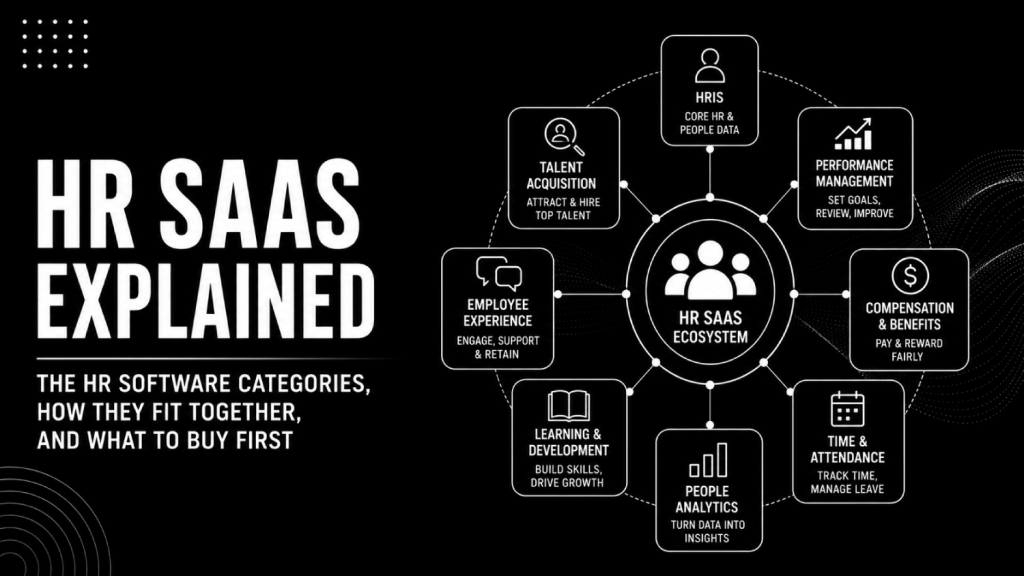
HR SaaS covers every cloud-delivered software category that manages the employment lifecycle: HRIS for employee records, payroll for compensation processing, ATS for recruiting, performance management for reviews and goal-setting, people analytics for workforce decisions, learning management for training, and benefits administration for enrollment and compliance. These categories are sold separately or bundled, often overlap in feature coverage, and should be bought in a deliberate sequence based on company size and what breaks first.
Why Does HR Software Feel Like One Big Confusing Bucket?
Vendors are the primary cause of this confusion. Every major HR platform calls itself an “all-in-one HCM suite” and lists 40 modules on its feature page. That framing serves sales cycles, not buyers. The reality is that even platforms like Workday, SAP SuccessFactors, and Oracle HCM started as single-category products and expanded by acquisition or roadmap over decades.
The second cause is that different HR roles use different vocabulary. An HRIS to a systems administrator is an HCM to a CHRO and a “people platform” to a startup founder. The underlying software may be identical. Learning the category names first removes most of the confusion.
What Are the Core HR SaaS Categories?
There are seven primary categories. Each solves a distinct operational problem. They can be bought from a single vendor or stitched together from best-of-breed tools.
1. HRIS (Human Resources Information System)
An HRIS is the system of record for employee data: names, roles, compensation, start dates, org structure, documents. Every other HR tool depends on it for accurate headcount data. Products like BambooHR, HiBob, Rippling, and Workday all lead with HRIS functionality. If your employee data currently lives in a spreadsheet and you are past 30 to 50 employees, moving to a dedicated HRIS should be your first HR tech purchase , below that threshold, a well-maintained spreadsheet is often genuinely sufficient. Our roundup of the best HR software platforms for mid-market companies covers the leading options across company stages.
2. Payroll
Payroll software calculates gross-to-net pay, handles tax withholding, files employer taxes, and issues payments on a defined schedule. Some HRIS platforms include payroll natively (Rippling, Gusto); others integrate with dedicated payroll engines like ADP or Paychex. Multi-state and international payroll add significant complexity. Gusto’s public pricing page lists plans starting at a base fee plus a per-employee monthly charge, though pricing changes frequently. For companies processing payroll across more than three states, a dedicated payroll tool with state-specific compliance automation is worth the added cost.
3. ATS (Applicant Tracking System)
An ATS manages job requisitions, candidate pipelines, interview scheduling, and offer letters. Products range from lightweight tools like Lever and Greenhouse to enterprise platforms like iCIMS and Workday Recruiting. Greenhouse is commonly cited as the standard for mid-market structured hiring. AI features in modern ATS products include automated screening, interview scorecards, and candidate ranking, though the quality of those features varies considerably by vendor.
4. Performance Management Software
This category covers goal-setting (OKRs and KPIs), continuous feedback, review cycles, and calibration. Lattice, 15Five, Leapsome, and Culture Amp are the dominant mid-market products. Most companies do not need dedicated performance software until they have 100-plus employees and are running formal review cycles. Before that point, a shared document works fine.
5. People Analytics
People analytics platforms turn HRIS and payroll data into workforce insights: headcount trends, attrition risk, span of control, pay equity, and productivity signals. Dedicated tools include Visier, One Model, and OrgVue. Most HRIS platforms offer basic reporting, but that reporting rarely answers strategic questions about where the business is heading. If you are still building headcount forecasts in Excel, you have already outgrown your current analytics setup.
6. Learning Management System (LMS)
An LMS delivers, tracks, and reports on employee training and development. Cornerstone, Docebo, and 360Learning are the primary mid-market options. For compliance-heavy industries like healthcare, financial services, and manufacturing, an LMS is a near-mandatory purchase. For knowledge-work companies under 300 employees, it is frequently skipped or replaced by a learning experience platform (LXP) like Degreed.
7. Benefits Administration
Benefits administration software handles open enrollment, carrier connections, employee elections, and ACA compliance. Benefitfocus, Bentek, and Zenefits (now part of TriNet) are established names. Many HRIS platforms include basic benefits enrollment; dedicated benefits tools add carrier EDI feeds, dependent verification, and compliance reporting that generic HRIS modules often lack.
How Do These Categories Map to Company Stage?
Buying sequence matters as much as product selection. A 30-person startup and a 1,500-person manufacturer have the same seven categories available to them but dramatically different needs. The table below maps which categories are standard purchases at each stage.
| Company Stage | Employees | Must-Have Categories | Optional at This Stage |
|---|---|---|---|
| Seed / Early Startup | 1 to 50 | Payroll, basic HRIS | ATS, performance, analytics, LMS, benefits admin |
| Growth Stage | 50 to 200 | HRIS, payroll, ATS | Performance, analytics, LMS |
| Mid-Market | 200 to 1,000 | HRIS, payroll, ATS, performance management, benefits admin | Dedicated analytics, LMS, talent intelligence |
| Enterprise | 1,000+ | All seven categories, plus talent intelligence, EOR, compensation management | Few: if it exists in HR, enterprise needs it |
The logic behind that table: at seed stage, payroll is the only true compliance requirement; HRIS earns its keep once you have enough people that tracking roles, start dates, and documents in a shared sheet creates errors or access-control problems, typically somewhere around 30 to 50 employees. The ATS becomes the priority at growth stage because unstructured hiring at 50-plus headcount creates legal and quality risk that a spreadsheet pipeline cannot manage. Performance tools follow once you are running formal review cycles , before that, they add overhead rather than removing it. For a detailed tool-by-tool recommendation with pricing context, see the HR tech stack guide for 50-person companies.
What Is the Difference Between HRIS, HCM, and HRMS?
These three acronyms describe the same category at different levels of scope. An HRIS is the baseline system of record. An HRMS (Human Resources Management System) adds workforce management features like time and attendance. An HCM (Human Capital Management) suite covers the full employment lifecycle from recruiting through succession planning, typically sold to mid-market and enterprise buyers.
Vendors use these terms interchangeably in marketing, which creates false distinctions. Workday calls itself an HCM. BambooHR calls itself an HRIS. Both manage employee records as their core function. The practical question is not which acronym a product uses but which modules are included and whether they cover your actual requirements. When evaluating options, work from your requirements list downward, not from vendor category labels upward.
Where Does AI Fit in HR SaaS Categories?
AI is not a separate HR software category. It is a capability layer that vendors are adding to every existing category at different levels of quality. Understanding where AI adds real value versus where it is marketing copy is one of the most important evaluation skills an HR buyer can develop right now.
Recruiting and Talent Acquisition
AI in recruiting covers resume screening, candidate sourcing, interview scheduling, and conversational chatbots for candidate communication. Tools like Eightfold AI, Phenom, and Beamery use large talent databases and machine learning to match candidates to roles. The best AI sourcing tools vary considerably in how they source from external talent pools versus internal databases, which matters for your specific hiring motion.
Performance and People Analytics
AI in analytics goes beyond dashboards to predictive models: attrition forecasting, span-of-control optimization, and productivity signal detection. The gap between vendors who bolt an “AI insights” label onto existing SQL queries and vendors who run genuine predictive models is large. Ask every vendor for a specific example of a prediction their model made, the accuracy rate, and how it was validated.
HR Service Delivery
AI chatbots and virtual agents for HR service delivery answer employee questions about benefits, payroll, leave, and policy. Moveworks, Leena AI, and ServiceNow HRSD handle this category. The value is measurable: reduced ticket volume to HR shared services. The risk is a poorly trained model that gives employees wrong information about their benefits or leave entitlements.
Before buying any AI-powered HR tool, review the 50-question AI HR vendor evaluation checklist to separate genuine machine learning from feature marketing.
What Does HR SaaS Actually Cost?
HR SaaS pricing follows a per-employee-per-month (PEPM) model in most categories, with annual contracts and volume discounts at higher headcounts. There is no single market rate because pricing varies by feature set, company size, contract length, and negotiating leverage.
Lightweight HRIS tools for small businesses (BambooHR, Gusto, Justworks) publish pricing on their websites and are genuinely affordable at under $10 to $20 PEPM for basic plans. Enterprise HCM platforms (Workday, SAP SuccessFactors, Oracle HCM) are quote-only and typically require six-figure annual contracts for mid-market deployments. The vendors rarely disclose these figures publicly. A detailed breakdown of what HRIS, payroll, and HCM platforms actually cost is in the HR software pricing explainer, including which hidden fees appear after contract signing.
The honest caveat on pricing: the number on the contract is not the total cost. Implementation, data migration, integration work, and ongoing administration add cost that many buyers do not factor in at evaluation time. The hidden costs of HR software guide covers the fees that show up after you sign.
All-in-One Platform vs. Best-of-Breed Stack: Which Should You Choose?
This is the central decision in HR tech stack design, and the answer depends entirely on company size and internal IT capacity.
An all-in-one platform (Workday, Rippling, UKG, BambooHR with add-ons) reduces integration complexity because data flows within a single system. You do not need an iPaaS or a middleware layer to sync employee records between HRIS and payroll. The trade-off is that no single platform leads every category. Workday’s recruiting module is adequate for most companies but lags behind dedicated ATS platforms for high-volume hiring teams.
A best-of-breed stack assembles the strongest product in each category: Greenhouse for ATS, Rippling for HRIS and payroll, Lattice for performance, Visier for analytics. The upside is quality in each function. The downside is integration work, vendor management overhead, and data consistency problems when employee records drift out of sync across systems. That integration challenge is often underestimated. The guide to how HR systems integrate explains the data flows between HRIS, payroll, ATS, and finance in practical terms.
A sensible default: companies under 500 employees should favor platforms with native payroll and HRIS integration (Rippling, Gusto, TriNet) and add best-of-breed tools only where the platform is genuinely insufficient. Companies above 500 employees can afford the integration overhead and should buy best-of-breed where it matters most.
What Are the Emerging HR SaaS Categories Worth Watching?
Several newer categories have moved from experimental to mainstream buying decisions in the last few years.
Talent Intelligence Platforms go beyond ATS by building a skills graph across internal employees and external talent pools. Eightfold AI, Beamery, and Gloat compete here. The distinction between a talent intelligence platform and an internal talent marketplace matters for what problem you are actually solving. The comparison of talent intelligence platforms versus internal talent marketplaces explains the functional difference and which to buy first.
Employer of Record (EOR) Platforms are now a standard purchase for any company hiring internationally without a local entity. Deel, Remote, and Rippling Global compete for this market. EOR pricing is generally published per country per employee per month, though rates vary significantly by jurisdiction.
HR AI Agents represent the newest category: software that takes autonomous action in HR workflows rather than just presenting information. Policy Q&A, leave request processing, and onboarding task orchestration are the early use cases. Most production deployments today are narrow in scope. The practical guide on AI HR agents covers what is real and what is still aspirational in 2024 and 2025 deployments.
Frequently Asked Questions
What is SaaS in HR?
SaaS in HR means cloud-delivered HR software where you pay a subscription fee and access the product through a browser, rather than installing software on your own servers. The vendor handles hosting, maintenance, and updates. Almost all modern HR software is SaaS-delivered, including HRIS platforms, ATS tools, payroll engines, and performance management systems. The practical implication is that you get continuous feature updates but also depend on the vendor’s uptime and security posture.
What are the main HR software categories?
The seven primary HR SaaS categories are: HRIS (employee records and org management), payroll, ATS (recruiting and applicant tracking), performance management, people analytics, learning management (LMS), and benefits administration. Secondary categories that are growing in adoption include talent intelligence, employer of record, compensation management, employee listening, and HR service delivery chatbots. Most companies do not buy all of them at once. Buying order should follow operational need, not vendor upsell pressure.
What is the most popular HR software?
Workday is the most widely cited HRIS and HCM platform at the enterprise level. For small and mid-size US companies, Gusto, BambooHR, and Rippling see the highest adoption. Greenhouse and Lever lead mid-market ATS adoption. Lattice and 15Five are the most common standalone performance management tools at growth-stage companies. Popularity does not equal fit. The right tool depends on company size, payroll complexity, and recruiting volume.
How much does HR SaaS cost per employee?
Pricing varies widely by category and vendor. Lightweight HRIS tools for small businesses publish rates in the range of $8 to $25 per employee per month on their public pricing pages, though add-ons raise that total. Enterprise HCM platforms like Workday and SAP SuccessFactors are quote-only and do not publish per-employee rates. Payroll tools typically charge a base platform fee plus a per-employee charge. The total HR tech stack cost for a mid-market company varies by configuration; the HR software pricing breakdown covers realistic ranges.
Do I need an HRIS or an HCM?
If you have fewer than 200 employees and mostly need employee records, onboarding, and basic reporting, an HRIS is sufficient , especially if recruiting is handled through a separate ATS. If you need recruiting, performance reviews, compensation planning, and analytics from a single platform, an HCM suite is the right direction. A useful rule of thumb: if your recruiting workflow needs to live inside the same system as your employee records and comp data, that points to HCM; if your ATS can stand alone and integrate via API, HRIS is enough. Buying an HCM when you need an HRIS typically means paying for features you will not use for two to three years.
Is there free HR software?
Some vendors offer limited free tiers: Zoho People and OrangeHRM have free plans with restricted features and user counts. In practice, most growing companies outgrow free-tier HR tools within the first 20 employees. Free plans rarely include payroll, automated tax filing, benefits enrollment, or integrations with other tools. They are useful for very early-stage companies that need basic employee record storage and nothing else.
When should I switch from a PEO to my own HRIS?
Most companies outgrow a PEO (Professional Employer Organization) arrangement between 100 and 300 employees, when the cost premium of co-employment (typically 2% to 12% of payroll, depending on benefits coverage) exceeds the cost of running standalone HR software and a dedicated HR team. The trigger is usually a combination of headcount growth, need for direct control over benefits design, and frustration with the PEO’s system limitations. Signs that you have already passed that threshold are covered in the article on when to replace your HRIS.
How do I build an HR software buying checklist?
Start with requirements: list every HR process you run today, every one you expect to run within 18 months, and the integrations you require with payroll, finance, and identity management. Then score vendors against requirements, not against their feature marketing. The HR software buying checklist with 75 evaluation questions covers HRIS, payroll, ATS, and HCM evaluation criteria in a format you can use directly in vendor demos.
The Mental Model That Simplifies Everything
Think of HR SaaS as a layer cake. The bottom layer is data: your HRIS holds the employee record that every other system draws from. The second layer is transactions: payroll moves money, ATS moves candidates, benefits enrollment moves elections. The third layer is decisions: performance reviews, analytics, and talent intelligence turn data and transactions into workforce strategy.
Most companies buy from the third layer before they have solid foundations in the first two. They buy a beautiful analytics platform and discover it cannot get clean headcount data out of their HRIS. They buy a talent intelligence tool and find it cannot integrate with their ATS. The buying order in the table above exists for this reason.
The companies that get HR tech right buy for the problem they have today, build integrations deliberately, and treat the all-in-one versus best-of-breed question as a recurring architectural review rather than a one-time decision. The stack you need at 100 employees is not the stack you need at 1,000. Plan for that evolution from the first purchase.